Getting Started

Last Update: 16/04/2026

note: this documentation is currently under construction and is possible that is going to change soon

Welcome to the subte.cc documentation! Here you will find any information you may need for the use of the service.

Setting up subte.cc

By going to the dashboard, you will be able to log in or create an account.

Once you have created an account, you will be met with the subte.cc dashboard, where you can generate a token required for updating domains outside of the dashboard.

Setting up automatic domain updates

Windows

If you are using a Windows machine, you can either use the client or the Task Scheduler method

Linux/Unix-Like

If you are using a Linux machine, or other Unix-Like OS, refer to the Unix-Like Guides:

Mobile Platforms

If you are using an Android device, refer to the Android app

Adding subte.cc to your program

If you want to add subte.cc support to your preexisting program or system, a handful of examples are provided for different languages:
API Specification

Last Update: 17/04/2026

Protocol and Request Type

Subte.cc only offers support for HTTPS and GET requests to the following endpoint:

https://subte.cc/up?

Supported Parameters

Multiple parameters can be specified separated by &

Domains

Single domain update:

https://subte.cc/up?domains=YOURDOMAINHERE

Multiple subdomains separated by comma (,) can be updated with only one request:

https://subte.cc/up?domains=DOMAIN1,DOMAIN2,DOMAIN3,DOMAIN4,DOMAIN5

IP

Specifies to which IP will the domains specified update to.

https://subte.cc/up?domains=YOURDOMAINHERE&ip=YOURIPHERE

If the IP parameter is unspecified, the detected one from the request will be used.

Token as header (Recommended)

The user authentication token can be sent as the following header for added security:

X-Api-Key: YOURTOKENHERE

(Case Sensitive)

Token (not reccommended, use headers instead)

Specifies the user authentication token

https://subte.cc/up?domains=YOURDOMAINHERE&token=YOURTOKENHERE

Added for easy DuckDNS format compatibility, not recommended for security reasons.

Responses

If the GET request is successful it will return:

OK

If the GET request failed (Invalid parameters, Incorrect token, etc) it will return:

KO

Unix-Like with cURL

Last Update: 15/04/2026

Single update with cURL

Single Domain

curl -H "X-Api-Key: YOURTOKENHERE" https://subte.cc/up?domains=YOURDOMAINNAMEHERE&ip=YOURIPHERE

Multiple Domains

curl -H "X-Api-Key: YOURTOKENHERE" https://subte.cc/up?domains=DOMAIN1,DOMAIN2&ip=YOURIPHERE

If no IP is specified in the request, the IP from where the request is made will be used.

Automatic updates using cron

This requires cron be supported by your distro and installed on the system

Open the crontab file with

crontab -e

Add the cronjob to the crontab file

0 * * * *  curl -H "X-Api-Key: YOURTOKENHERE" https://subte.cc/up?domains=YOURDOMAINNAMEHERE&ip=YOURIPHERE

This will update every every hour

Update frequency can be adjusted by changing the 5 parameters, ordered by

*    *    *    *    *
|    |    |    |    |
|    |    |    |    |
|    |    |    |    |
|    |    |    | Day of week(0-6 | Sun-Sat)
|    |    |    |
|    |    |  Month(1-12)
|    |    |
|    |  Day of Month(1-31)
|    |
|   Hour(0-23)
|
Min(0-59)

Return to Home

subte.cc client for Windows

Last Update: 17/04/2026

Download here

Works on Windows 7 onwards, requires .NET Framework 4.7.2

Domains Tab

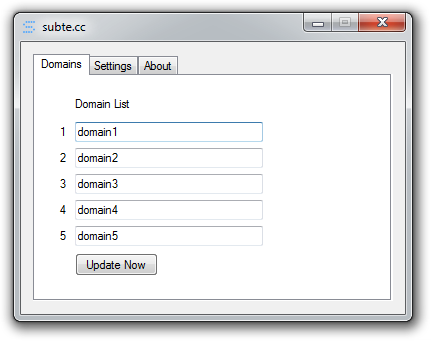
Domains Page

This page shows a 5 input fields for each domain to be updated. With a manual update button for testing.

Settings

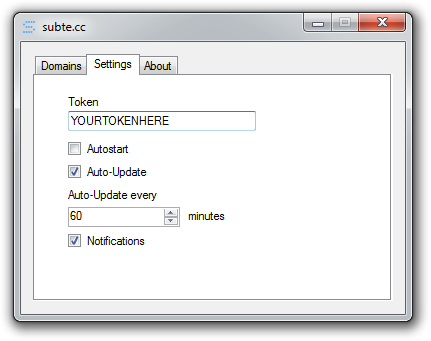
Here you can tweak the behaviour of the program.

Settings Page

The main elements are:

  • Token: The API access token provided on the dashboard.
  • Autostart: Enables subte.cc to start upon user logon.
  • Auto-Update: Makes domains update automatically after certain time period.
  • Auto-Update every: Sets the time in minutes to wait until next update.
  • Notifications: Enables notifications indicating update and program status.

Notifications

Notifications on the notification tray area indicate the update and program status, the main notifications are:

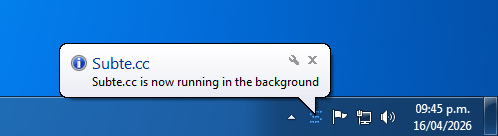
Subte.cc is now running in the background

Shown when program is minimized with Autostart ON or when it started on user logon.

Background Notification

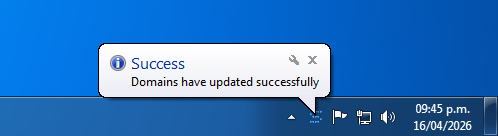
Domains have updated successfully

Shown when domains set on the domain tab have been updated successfully.

Success Notification

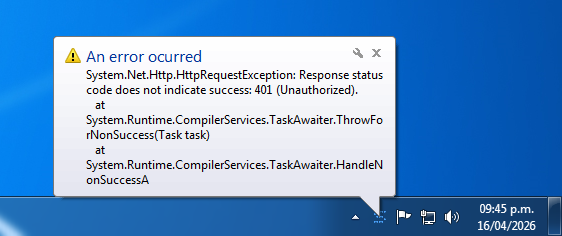
An error ocurred

If there was an error during the domain update proccess, detailed information about the error is shown.

Error Notification

Error 401 (Unauthorized), usually caused when user is making updates too quickly

Set Up subte.cc with Task Scheduler

Last Update: 16/04/2026

This part of the documentation is being worked on, please follow the development and news

Android

Last Update: 19/04/2026

This part of the documentation is being worked on, please follow the development and news

C# Implementation

Last Update: 18/04/2026

Uses System.Net.Http library from .NET Framework 4.5 onwards


static HttpClient client = new HttpClient(); // Creates a new HttpClient object

String domain = "YOURDOMAINHERE";
String token = "YOURTOKENHERE";

private async void updateip()
        {
            string url = "https://subte.cc/up?domains=" + domain; // Sets the url to make the request to
            client.DefaultRequestHeaders.Add("X-Api-Key", token); // Sets user token as request header
            try
            { 
               string response = await client.GetStringAsync(url); // Get request
            }
            catch (HttpRequestException ex)
            {
            	// Code if request has failed goes here
            }

Kotlin Implementation

Last Update: 18/04/2026

import java.io.BufferedReader
import java.io.InputStreamReader
import java.net.URL
import javax.net.ssl.HttpsURLConnection

fun updateIPs(token: String, domain: String) {

        var connection: HttpsURLConnection
        val url = URL("https://subte.cc/up?domains=$domain") // Sets the url to make the request to

        connection = url.openConnection() as HttpsURLConnection
        connection.setRequestMethod("GET") // Sets request type to GET
        connection.setConnectTimeout(10000) // Sets connection timeout
        connection.setReadTimeout(10000) // Sets request response timeout
        connection.setRequestProperty("X-Api-Key", token) // Sets token as request header

        try {
            BufferedReader(InputStreamReader(connection.getInputStream())).use { `in` -> // Makes request
                val response = StringBuilder()
                var line: String?
                while ((`in`.readLine().also { line = it }) != null) {
                    response.append(line) 
                }
            }
        }catch(e: Exception){
        	// Code if request has failed goes here
        }
}

Python Implementation

Last Update: 19/04/2026

import requests

def update_ips(token: str, domain: str):
    url = "https://subte.cc/up"
    headers = {
        "X-Api-Key": token
    }
    params = {
        "domains": domain
    }

    try:
        response = requests.get(url, headers=headers, params=params, timeout=10)
        response.raise_for_status()
        return response.text

    except requests.exceptions.RequestException as e:
        print(f"Request failed: {e}")


# Example usage
if __name__ == "__main__":
    token = "token-here"
    domain = "example.subte.cc"

    response = update_ips(token, domain)
    if response:
        print("Response:", response)